Automated Name Resolution
Okay, it's time to be honest with you. In the last chapter, we kinda cheated... we used our docker-compose.yaml file to insert entries into our /etc/hosts file for name resolution. We did this just to show you how name resolution basically works, but that is not a real-world solution to the problem of name-resolution. In the real world, doing this kind of thing is nearly impossible because we can't go around and edit a file on every single computer on the internet. Even if we could do that, keeping all those /etc/hosts files synchronized with each other would be unthinkable.
So, in this chapter, we're going to start over. We've removed those /etc/hosts entries and we're starting off with nothing configured for name resolution. What can we do to solve the problem of name resolution without using our little Docker hack?
Goal
Let's start with the simplest thing we can do: we're gonna head down the route of using a zero-configuration solution called avahi. By the end of this chapter, you should be able to ping or use links to reach each host using their hostnames on our little internet without configuring names on each host!
Preface: the shape of our internet
First, let's check out what our little internet looks like for this chapter:
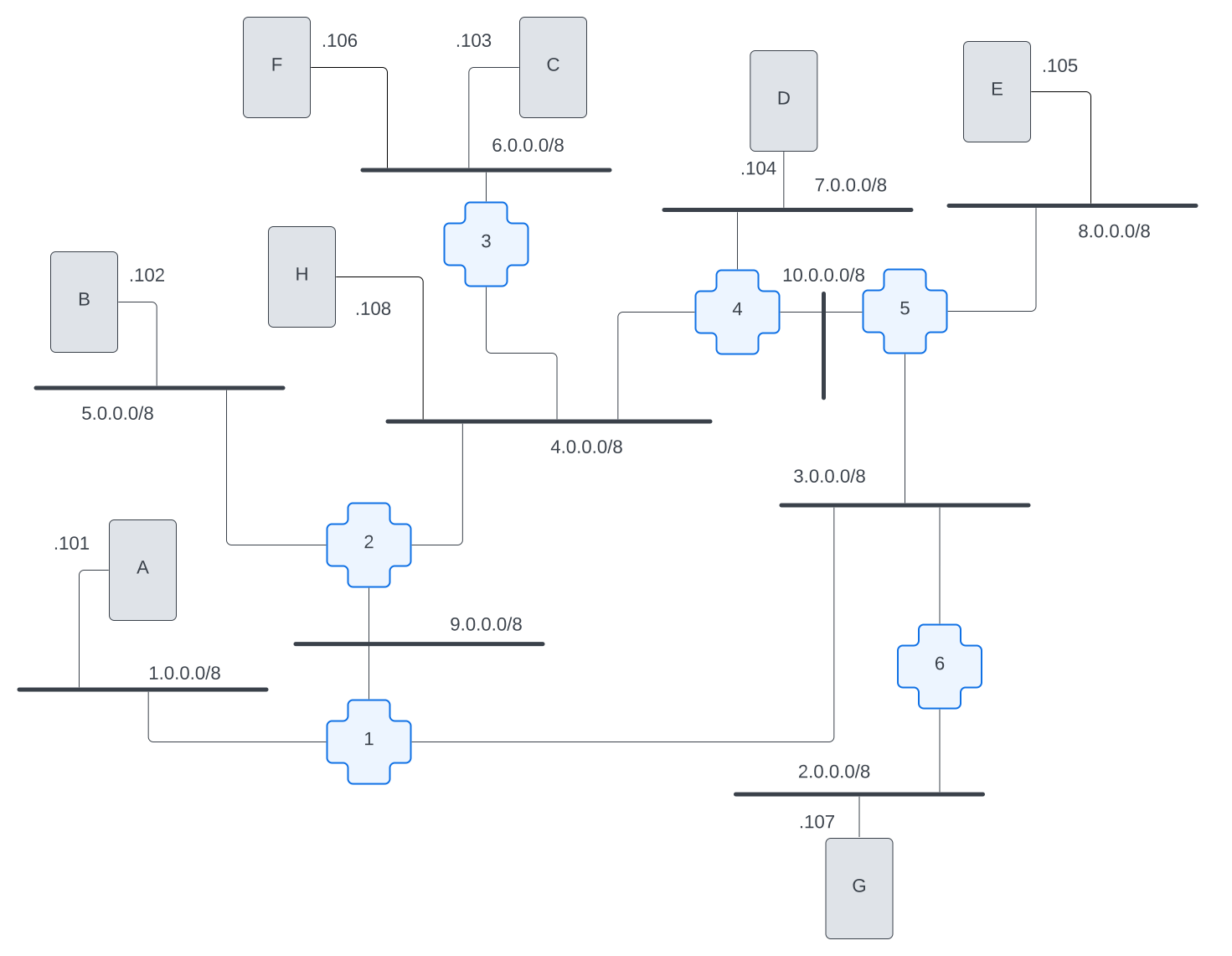
The significant things to note about this internet are that we have 2 machines on one network, host-c and host-f are on 6.0.0.0/8, and we added a new host, host-h, to the 4.0.0.0/8 network. host-h is only one hop away from host-c and host-f. This means that requests from host-h <=> host-c only need to be routed through one router. This simplifies what we're looking at when we are checking what's happening on our internet. We wanted to have a request path that involved one and only one router; adding host-h handled that for us.
Avahi and avahi-daemon
Avahi is a program which uses multicast to perform name resolution on local networks with minimal configuration. If you check the Dockerfile for this chapter, you'll see that we added a new software, avahi-utils.
As you might recall, in chapter 1, we took a look at the contents of /etc/nsswitch.conf. We saw that the hosts line provided instructions for how to resolve a name. The order runs sequentially through each entry in that line; it starts with looking at the files on the system (i.e. /etc/hosts), and, if it doesn't find the name there, then it should use dns (if it is configured).
Let's start off by taking a quick look at the /etc/nsswitch.conf file on our machines now.
Once you've byoi-rebuilded for this chapter, hopon host-c and cat /etc/nsswitch.conf. This file suddenly looks a little different! The reason for this is that when we installed avahi-utils, it added a couple new entries into that hosts line to direct name resolution requests for itself.
hosts: files mdns4_minimal [NOTFOUND=return] dnsLet's look at what each of these entries is doing (a couple of them will be review from chapter 1):
files: Check for an entry for this hostname in a local file. In UNIX-based systems, that file would be/etc/hosts.mdns4_minimal: This is new! This instructs the machine to attempt to resolve a name using a multicast resolver. This is specific to resolving hostnames in the local network.[NOTFOUND=return]: If the hostname matches the Top Level Domain (TLD) formdns4_minimal, e.g..local, but the hostname cannot be resolved, this entry tells it not to send this request out to the open internet. For example, if we requestedhost-x.local(which doesn't exist on our little internet), then don't make an open internet request.dns: If we hit this, then we gotta outsource this request to the larger internet; check the/etc/resolv.conffile for where we should send our DNS queries.
📝 NOTE: In order to ensure that Docker wasn't trying to "help" us with name resolution for these chapters, we nerfed the
/etc/resolv.conffile. Therefore thednsentry in/etc/nsswitch.confwon't do anything on these hosts.
Using Multicast to Resolve Names Between 2 Hosts on the Same Network
First, let's check to make sure avahi-daemon is already running on our hosts.
📝 NOTE: If you haven't encountered "daemons" before, go check the glossary entry for daemons
Go ahead and hopon host-c and run ps aux to get a list of processes that are currently running on the host.
root@host-c:/# ps aux | grep avahi
avahi         14  0.0  0.1   7236  2696 ?        S    18:14   0:00 avahi-daemon: running [host-c.local]
avahi         15  0.0  0.0   7136  1300 ?        S    18:14   0:00 avahi-daemon: chroot helper
root          42  0.0  0.0   3472  1792 pts/0    S+   18:20   0:00 grep --color=auto avahi
We can see that the avahi-daemon is running. Huzzah!
We should be able to use that running service to perform name resolution on our local network. Let's start by pinging host-f. The first thing ping will have to do is resolve the hostname to an IP address. But, just like in other chapters, we wanna see what's happening behind the scenes in all this communication. Let's use our old friend tcpdump!
Performing a tcpdump to examine multicast name-resolution on one network
We'll need to open 3 terminal sessions (the order is important here):
host-f:tcpdump -nvvvhost-c:tcpdump -nvvvhost-c:ping -w1 host-f
root@host-c:/# ping -w1 host-f
ping: host-f: Temporary failure in name resolution
Oh no... As you can see, we still have a name resolution failure here. Not only that, we're not even seeing any packets on host-c's tcpdump: the machine is not even attempting to send any packets across the network to figure out the IP address for host-f. Because /etc/hosts (files entry from /etc/nsswitch.conf) doesn't contain this name and because /etc/resolv.conf (dns entry) has been commented out to disable DNS, only multicast DNS (mdns4_minimal) is available to us.
So what's happening? Why doesn't it send multicast messages to find the name?
Well, when we check the Avahi docs, we can see that Avahi responds to *.local hostnames. Let's see what happens when we run the same ping, but this time to host-f.local:
root@host-c:/# ping -w1 host-f.local
PING host-f.local (6.0.0.106) 56(84) bytes of data.
64 bytes from 6.0.0.106: icmp_seq=1 ttl=64 time=0.309 ms

--- host-f.local ping statistics ---
1 packets transmitted, 1 received, 0% packet loss, time 0ms
rtt min/avg/max/mdev = 0.309/0.309/0.309/0.000 ms
Success! host-c was able to find the correct IP address (6.0.0.106) for the host-f.local name. But how exactly did it do it? Let's look at the output from the tcpdump captures.
All this tcpdump output can be a little overwhelming. To help with formatting, we have collapsed the output in this readme file. You can click on each command below to see the full output block of what we saw when we ran these commands on our machines.
host-c: tcpdump -nvvv
19:59:53.972283 IP (tos 0x0, ttl 255, id 50541, offset 0, flags [DF], proto UDP (17), length 58)
    6.0.0.103.5353 > 224.0.0.251.5353: [bad udp cksum 0xe799 -> 0x628b!] 0 A (QM)? host-f.local. (30)
19:59:53.973513 IP (tos 0x0, ttl 255, id 46184, offset 0, flags [DF], proto UDP (17), length 68)
    6.0.0.106.5353 > 224.0.0.251.5353: [bad udp cksum 0xe7a6 -> 0x578d!] 0*- [0q] 1/0/0 host-f.local. (Cache flush) [2m] A 6.0.0.106 (40)
19:59:53.975708 ARP, Ethernet (len 6), IPv4 (len 4), Request who-has 6.0.0.106 tell 6.0.0.103, length 28
19:59:53.975823 ARP, Ethernet (len 6), IPv4 (len 4), Reply 6.0.0.106 is-at 02:42:06:00:00:6a, length 28
19:59:53.975842 IP (tos 0x0, ttl 64, id 65145, offset 0, flags [DF], proto ICMP (1), length 84)
    6.0.0.103 > 6.0.0.106: ICMP echo request, id 20, seq 1, length 64
19:59:53.975981 IP (tos 0x0, ttl 64, id 47696, offset 0, flags [none], proto ICMP (1), length 84)
    6.0.0.106 > 6.0.0.103: ICMP echo reply, id 20, seq 1, length 64
19:59:59.124685 ARP, Ethernet (len 6), IPv4 (len 4), Request who-has 6.0.0.103 tell 6.0.0.106, length 28
19:59:59.124705 ARP, Ethernet (len 6), IPv4 (len 4), Reply 6.0.0.103 is-at 02:42:06:00:00:67, length 28
host-f: tcpdump -nvvv
19:59:53.972447 IP (tos 0x0, ttl 255, id 50541, offset 0, flags [DF], proto UDP (17), length 58)
    6.0.0.103.5353 > 224.0.0.251.5353: [bad udp cksum 0xe799 -> 0x628b!] 0 A (QM)? host-f.local. (30)
19:59:53.973418 IP (tos 0x0, ttl 255, id 46184, offset 0, flags [DF], proto UDP (17), length 68)
    6.0.0.106.5353 > 224.0.0.251.5353: [bad udp cksum 0xe7a6 -> 0x578d!] 0*- [0q] 1/0/0 host-f.local. (Cache flush) [2m] A 6.0.0.106 (40)
19:59:53.975768 ARP, Ethernet (len 6), IPv4 (len 4), Request who-has 6.0.0.106 tell 6.0.0.103, length 28
19:59:53.975786 ARP, Ethernet (len 6), IPv4 (len 4), Reply 6.0.0.106 is-at 02:42:06:00:00:6a, length 28
19:59:53.975877 IP (tos 0x0, ttl 64, id 65145, offset 0, flags [DF], proto ICMP (1), length 84)
    6.0.0.103 > 6.0.0.106: ICMP echo request, id 20, seq 1, length 64
19:59:53.975944 IP (tos 0x0, ttl 64, id 47696, offset 0, flags [none], proto ICMP (1), length 84)
    6.0.0.106 > 6.0.0.103: ICMP echo reply, id 20, seq 1, length 64
19:59:59.124551 ARP, Ethernet (len 6), IPv4 (len 4), Request who-has 6.0.0.103 tell 6.0.0.106, length 28
19:59:59.124771 ARP, Ethernet (len 6), IPv4 (len 4), Reply 6.0.0.103 is-at 02:42:06:00:00:67, length 28
Okay, let's see if we can make sense of all this by following the timestamps.
What's a timestamp? Well, the first thing in each line of the tcpdump output is the exact time that the packet was seen. These timestamps look a little something like this: 19:59:53.972283. This means that when the machine running tcpdump saw a packet, it looked at its watch and found that the time was approximately 8:00pm local time (this is in 24-hour time). But computers have very precise clocks, and the exact time of this packet was 7:59pm and 53 seconds and 972 hundred-thousanths of a second! This kind of precision might seems a little ridiculous, but when packets are flying around the network quickly, having very exact time for each one is essential to help us understand which ones came first and which ones came next.
Since we have precise timestamps being reported for each packet by host-c and host-f (and note that the clocks on both of these machines are synchronized), we can look back and forth between the output from both machines and put the packets in chronological order. So let's look at the timestamps across all the output: what's the first thing you see happening?
host-c: 19:59:53.972283 IP (tos 0x0, ttl 255, id 50541, offset 0, flags [DF], proto UDP (17), length 58) 6.0.0.103.5353 > 224.0.0.251.5353: [bad udp cksum 0xe799 -> 0x628b!] 0 A (QM)? host-f.local. (30)
So remember that we started this process with a ping command on host-c. Now, before host-c can send out a ping packet, it needs to know the IP address of the machine its sending them to. All the computer knows from the command we typed in was that we wanted to send a ping to host-f.local. So host-c's first job is to figure out what IP address is associated with host-f.local.
Next, we know that host-c is configured through /etc/nsswitch.conf to use multicast to look up any .local address.
📝 NOTE: But, what is this multicast anyway? We haven't really talked about it. Strictly speaking, a multicast IP address is any IP address within the
224.0.0.0/4subnet. Any time a message is sent to an IP address in this range, it will be "multicasted". For an Ethernet network like the one that our hosts are both on, this really just means that the packet will be broadcasted to every machine on that network.
However, beyond just broadcasting to every machine, multicast has one other interesting property, and that is that specific multicast IP addresses are registered for specific uses. In our case, 224.0.0.251 is reserved for multicast DNS requests. So we're seeing, in this first tcpdump entry, a message being sent to all machines on this ethernet network to this special IP address using the port 5353, which is also reserved for multicast DNS requests.
So, on this line, we see that host-c (6.0.0.103) is making a request to a known multicast DNS IP address and port for name resolution for host-f.local.
Okay, so what is the next packet that we see chronologically in these tcpdumps?
host-f: 19:59:53.972447 IP (tos 0x0, ttl 255, id 50541, offset 0, flags [DF], proto UDP (17), length 58) 6.0.0.103.5353 > 224.0.0.251.5353: [bad udp cksum 0xe799 -> 0x628b!] 0 A (QM)? host-f.local. (30)
We see the name resolution request packet that host-c sent hitting host-f. This is the exact same packet we saw above, except this time from host-f's perspective.
So why is host-f receiving a packet for 224.0.0.251? Because it's being broadcast on this ethernet network.
We've seen something similar in previous chapters: ARP (a quick reminder on how ARP and ethernet works). ARP is a protocol that enables IP discovery between machines on a network. ARP doesn't need to know the IP address of each machine ahead of time because it can send packets to all machines to find out which machine owns an address. Similarly, multicast doesn't need to know the IP addresses of the hosts it wants to communicate with. Both ARP and multicast are using the same underlying capability within the ethernet, namely, ethernet broadcast.
Okay, so what's the next packet chronologically between the two tcpdumps?
host-f: 19:59:53.973418 IP (tos 0x0, ttl 255, id 46184, offset 0, flags [DF], proto UDP (17), length 68) 6.0.0.106.5353 > 224.0.0.251.5353: [bad udp cksum 0xe7a6 -> 0x578d!] 0*- [0q] 1/0/0 host-f.local. (Cache flush) [2m] A 6.0.0.106 (40)
Here, we see that host-f sends a response packet to the same multicast IP address basically saying "IT ME!", passing its own IP address, 6.0.0.106. This message tells machines on the network to flush their caches for this hostname and cache this new response for 2m (2 minutes).
host-c: 19:59:53.973513 IP (tos 0x0, ttl 255, id 46184, offset 0, flags [DF], proto UDP (17), length 68) 6.0.0.106.5353 > 224.0.0.251.5353: [bad udp cksum 0xe7a6 -> 0x578d!] 0*- [0q] 1/0/0 host-f.local. (Cache flush) [2m] A 6.0.0.106 (40)
Next, host-c receives host-f's response packet, which says "hey, if you have a cached response for host-f.local, go ahead and flush that cache and instead cache this IP address for 2m (2 minutes)".
Et voila! We have name resolution. If you follow the rest of the tcpdumps, you'll see content we've already talked about: ARP, followed by ICMP echo requests and replies.
Resolving Names Between Hosts on Two Different Networks
OK! We got a ping working! But if we look at the network diagram pictured at the top of this chapter, we can see that host-c and host-f are on the same network. What happens if we try to ping host-h.local, from host-c (which is on a different network)?
root@host-c:/# ping -w2 host-h.local
ping: host-h.local: Name or service not known
Avahi name-resolution only really works on local networks: in this case, machines that can communicate directly with one another via broadcast on ethernet.
Since Avahi's IP multicast gets translated to ethernet broadcast messages, routers ignore these messages. The messages therefore never get sent to the broader internet. To put this more simply, host-c and host-f are on the same network, so they can exchange ethernet broadcast messages with each other directly. host-h, however, has to be reached through our internet, which requires routers to participate in this communication. If you have reviewed our appendix on IP and MAC addresses, you will be familiar with this.
What is this "multicast" stuff anyway, and why it doesn't matter
In general, multicast is intended to be used either on a single network or a private internetwork, and it cannot be used in a public internet. We want to use Avahi for name resolution across our (private) internetwork. In that context, there is more than one way to implement it.
Option 1 - Multicast Routing: Install Avahi on all of the hosts so that each host sends multicast packets for name resolution. Then set up our routers so that they understand multicast and can route multicast packets properly around our internet.
Option 2 - Avahi Proxy: Install Avahi on both the routers and the hosts and have the routers participate as avahi name-resolvers.
We truly wanted to try implementing option 1 to show how it could be done. Multicast routing is something that was developed decades ago when computers were still young and we did not have a robust understanding about how networks would be used. Since multicast routing is highly insecure, Avahi does not recommend implementing it.
Therefore, we ended up going with option 2. We're going to install the same Avahi software on our routers as we installed on the hosts. This way, our routers will be aware of name-resolution requests and will participate in name-resolution requests by proxy. The routers will receive name-resolution packets and then make their own queries to discover the address for the destination name.
Getting the Routers in on the Game
Soooooo, we kinda tricked you. The default build we created for this chapter only has avahi-daemon running on the hosts, not the routers. If you check the network diagram above, you'll see that the network host-c is on and the network host-h is on are connected by router-3. In order for name resolution to work between these networks, we need to get router-3 in on the game!
hopon router-3 and run avahi-daemon --daemonize to get Avahi set up for name resolution between these networks!
Now that router-3 is participating, let's see name resolution working across networks. Let's re-run that ping on host-c, while capturing packets. This time we need a few more terminal sessions open to watch what's happening on each machine:
host-h: runtcpdump -nrouter-3: runtcpdump -nvvvi eth0router-3: runtcpdump -nvvvi eth1host-c: runtcpdump -nhost-c: runping host-h.local -c2
Make sure you keep track of which interface is on which network for router-3. We want to be able to examine the packets running through each machine, and knowing the interface will help you understand the story!
Let's start by looking at the ping output from host-c.
root@host-c:/# ping host-h.local -c2
PING host-h.local (4.0.0.108) 56(84) bytes of data.
64 bytes from 4.0.0.108: icmp_seq=1 ttl=63 time=0.209 ms
64 bytes from 4.0.0.108: icmp_seq=2 ttl=63 time=0.319 ms

--- host-h.local ping statistics ---
2 packets transmitted, 2 received, 0% packet loss, time 1031ms
rtt min/avg/max/mdev = 0.209/0.264/0.319/0.055 ms
Here we can see the name resolution was successful! That PING host-h.local (4.0.0.108)... shows that host-c knows that host-h.local resolves to 4.0.0.108. It can now send packets to that IP in order to complete the ping. But let's look at what was involved in performing that name resolution.
Just like we saw before, the rest of this output is a little overwhelming. You can click on each command to see the full output block of what we saw when we ran these commands on our machines.
host-h: tcpdump -n
root@host-h:/# tcpdump -n
tcpdump: verbose output suppressed, use -v[v]... for full protocol decode
listening on eth0, link-type EN10MB (Ethernet), snapshot length 262144 bytes
19:58:36.777779 IP 4.0.3.1.5353 > 224.0.0.251.5353: 0 A (QM)? host-h.local. (30)
19:58:36.782619 IP 4.0.0.108.5353 > 224.0.0.251.5353: 0*- [0q] 1/0/0 (Cache flush) A 4.0.0.108 (40)
19:58:36.787645 IP 6.0.0.103 > 4.0.0.108: ICMP echo request, id 8, seq 1, length 64
19:58:36.787669 IP 4.0.0.108 > 6.0.0.103: ICMP echo reply, id 8, seq 1, length 64
19:58:37.819176 IP 6.0.0.103 > 4.0.0.108: ICMP echo request, id 8, seq 2, length 64
19:58:37.819206 IP 4.0.0.108 > 6.0.0.103: ICMP echo reply, id 8, seq 2, length 64
19:58:42.040638 ARP, Request who-has 4.0.3.1 tell 4.0.0.108, length 28
19:58:42.040762 ARP, Request who-has 4.0.0.108 tell 4.0.3.1, length 28
19:58:42.040850 ARP, Reply 4.0.0.108 is-at 02:42:04:00:00:6a, length 28
19:58:42.040916 ARP, Reply 4.0.3.1 is-at 02:42:04:00:03:01, length 28
^C
10 packets captured
10 packets received by filter
0 packets dropped by kernel
router-3: tcpdump -nvvvi eth0
root@router-3:/# tcpdump -nvvvi eth0
tcpdump: listening on eth0, link-type EN10MB (Ethernet), snapshot length 262144 bytes
19:58:36.777712 IP (tos 0x0, ttl 255, id 35930, offset 0, flags [DF], proto UDP (17), length 58)
    4.0.3.1.5353 > 224.0.0.251.5353: [bad udp cksum 0xe833 -> 0x61f1!] 0 A (QM)? host-h.local. (30)
19:58:36.782772 IP (tos 0x0, ttl 255, id 50413, offset 0, flags [DF], proto UDP (17), length 68)
    4.0.0.108.5353 > 224.0.0.251.5353: [bad udp cksum 0xe5a6 -> 0x5b8d!] 0*- [0q] 1/0/0 host-h.local. (Cache flush) [2m] A 4.0.0.108 (40)
19:58:36.787610 IP (tos 0x0, ttl 63, id 24750, offset 0, flags [DF], proto ICMP (1), length 84)
    6.0.0.103 > 4.0.0.108: ICMP echo request, id 8, seq 1, length 64
19:58:36.787697 IP (tos 0x0, ttl 64, id 8806, offset 0, flags [none], proto ICMP (1), length 84)
    4.0.0.108 > 6.0.0.103: ICMP echo reply, id 8, seq 1, length 64
19:58:37.819136 IP (tos 0x0, ttl 63, id 24918, offset 0, flags [DF], proto ICMP (1), length 84)
    6.0.0.103 > 4.0.0.108: ICMP echo request, id 8, seq 2, length 64
19:58:37.819244 IP (tos 0x0, ttl 64, id 8949, offset 0, flags [none], proto ICMP (1), length 84)
    4.0.0.108 > 6.0.0.103: ICMP echo reply, id 8, seq 2, length 64
19:58:42.040666 ARP, Ethernet (len 6), IPv4 (len 4), Request who-has 4.0.0.108 tell 4.0.3.1, length 28
19:58:42.040748 ARP, Ethernet (len 6), IPv4 (len 4), Request who-has 4.0.3.1 tell 4.0.0.108, length 28
19:58:42.040822 ARP, Ethernet (len 6), IPv4 (len 4), Reply 4.0.3.1 is-at 02:42:04:00:03:01, length 28
19:58:42.040929 ARP, Ethernet (len 6), IPv4 (len 4), Reply 4.0.0.108 is-at 02:42:04:00:00:6a, length 28
^C
10 packets captured
10 packets received by filter
0 packets dropped by kernel
router-3: tcpdump -nvvvi eth1
root@router-3:/# tcpdump -nvvvi eth1
tcpdump: listening on eth1, link-type EN10MB (Ethernet), snapshot length 262144 bytes
19:58:36.776906 IP (tos 0x0, ttl 255, id 6263, offset 0, flags [DF], proto UDP (17), length 58)
    6.0.0.103.5353 > 224.0.0.251.5353: [bad udp cksum 0xe799 -> 0x628b!] 0 A (QM)? host-h.local. (30)
19:58:36.785114 IP (tos 0x0, ttl 255, id 15580, offset 0, flags [DF], proto UDP (17), length 68)
    6.0.3.1.5353 > 224.0.0.251.5353: [bad udp cksum 0xea3d -> 0x56f6!] 0*- [0q] 1/0/0 host-h.local. (Cache flush) [2m] A 4.0.0.108 (40)
19:58:36.787590 IP (tos 0x0, ttl 64, id 24750, offset 0, flags [DF], proto ICMP (1), length 84)
    6.0.0.103 > 4.0.0.108: ICMP echo request, id 8, seq 1, length 64
19:58:36.787710 IP (tos 0x0, ttl 63, id 8806, offset 0, flags [none], proto ICMP (1), length 84)
    4.0.0.108 > 6.0.0.103: ICMP echo reply, id 8, seq 1, length 64
19:58:37.819110 IP (tos 0x0, ttl 64, id 24918, offset 0, flags [DF], proto ICMP (1), length 84)
    6.0.0.103 > 4.0.0.108: ICMP echo request, id 8, seq 2, length 64
19:58:37.819264 IP (tos 0x0, ttl 63, id 8949, offset 0, flags [none], proto ICMP (1), length 84)
    4.0.0.108 > 6.0.0.103: ICMP echo reply, id 8, seq 2, length 64
19:58:42.040599 ARP, Ethernet (len 6), IPv4 (len 4), Request who-has 6.0.0.103 tell 6.0.3.1, length 28
19:58:42.040775 ARP, Ethernet (len 6), IPv4 (len 4), Request who-has 6.0.3.1 tell 6.0.0.103, length 28
19:58:42.040877 ARP, Ethernet (len 6), IPv4 (len 4), Reply 6.0.3.1 is-at 02:42:06:00:03:01, length 28
19:58:42.040903 ARP, Ethernet (len 6), IPv4 (len 4), Reply 6.0.0.103 is-at 02:42:06:00:00:67, length 28
^C
10 packets captured
10 packets received by filter
0 packets dropped by kernel
host-c: tcpdump -n
root@host-c:/# tcpdump -n
tcpdump: verbose output suppressed, use -v[v]... for full protocol decode
listening on eth0, link-type EN10MB (Ethernet), snapshot length 262144 bytes
19:58:36.776848 IP 6.0.0.103.5353 > 224.0.0.251.5353: 0 A (QM)? host-h.local. (30)
19:58:36.785144 IP 6.0.3.1.5353 > 224.0.0.251.5353: 0*- [0q] 1/0/0 (Cache flush) A 4.0.0.108 (40)
19:58:36.787560 IP 6.0.0.103 > 4.0.0.108: ICMP echo request, id 8, seq 1, length 64
19:58:36.787743 IP 4.0.0.108 > 6.0.0.103: ICMP echo reply, id 8, seq 1, length 64
19:58:37.819056 IP 6.0.0.103 > 4.0.0.108: ICMP echo request, id 8, seq 2, length 64
19:58:37.819299 IP 4.0.0.108 > 6.0.0.103: ICMP echo reply, id 8, seq 2, length 64
19:58:42.040695 ARP, Request who-has 6.0.3.1 tell 6.0.0.103, length 28
19:58:42.040733 ARP, Request who-has 6.0.0.103 tell 6.0.3.1, length 28
19:58:42.040794 ARP, Reply 6.0.0.103 is-at 02:42:06:00:00:67, length 28
19:58:42.040942 ARP, Reply 6.0.3.1 is-at 02:42:06:00:03:01, length 28
^C
10 packets captured
10 packets received by filter
0 packets dropped by kernel
Similar to how we were examining the output of the tcpdump of the ping from host-c to host-f, let's follow the timestamps in chronological order for each line of output from each machine.
host-c: 19:58:36.776848 IP 6.0.0.103.5353 > 224.0.0.251.5353: 0 A (QM)? host-h.local. (30)
As we saw before, host-c is sending a name resolution query for host-h.local on the multicast DNS IP address (224.0.0.251) and port (5353). Because this request is being sent to a multicast address, it will be broadcast to every machine on the ethernet network.
router-3, eth1 19:58:36.776906 IP (tos 0x0, ttl 255, id 6263, offset 0, flags [DF], proto UDP (17), length 58) 6.0.0.103.5353 > 224.0.0.251.5353: [bad udp cksum 0xe799 -> 0x628b!] 0 A (QM)? host-h.local. (30)
router-3 receives the name-resolution request broadcast from host-c. This is exact same packet we saw above, except this time from router-3's perspective.
router-3, eth0 19:58:36.777712 IP (tos 0x0, ttl 255, id 35930, offset 0, flags [DF], proto UDP (17), length 58) 4.0.3.1.5353 > 224.0.0.251.5353: [bad udp cksum 0xe833 -> 0x61f1!] 0 A (QM)? host-h.local. (30)
Now here's something different: we see router-3 generating its own request for name resolution for host-h.local. At first blush, this looks like the same packet we saw on eth1 for router-3... but there's one big important difference. Look at the source IP address: 4.0.3.1. That's router-3's address on 4.0.0.0/8, not host-c's address on 6.0.0.0/8...
What's happening here? router-3 received host-c's request, and rather than just forwarding host-c's packet, router-3 initiated it's own name resolution process. It will respond back to host-c directly once it has an answer. This is textbook proxy behavior! :D
host-h 19:58:36.777779 IP 4.0.3.1.5353 > 224.0.0.251.5353: 0 A (QM)? host-h.local. (30)
host-h receives the name resolution request from router-3 for itself. Remember, this is the nature of multicasting: any packet destined for a multicast IP address-range (the 224.0.0.0/4 subnet) will be broadcast to every machine on the ethernet network.
host-h 19:58:36.782619 IP 4.0.0.108.5353 > 224.0.0.251.5353: 0*- [0q] 1/0/0 (Cache flush) A 4.0.0.108 (40)
host-h sends a response packet to the multicast DNS address, passing its own IP address, 4.0.0.108 ("it me! 🤚"). This packet also includes instructions to flush the cache for the name host-h.local and cache this new address instead.
router-3, eth0 19:58:36.782772 IP (tos 0x0, ttl 255, id 50413, offset 0, flags [DF], proto UDP (17), length 68) 4.0.0.108.5353 > 224.0.0.251.5353: [bad udp cksum 0xe5a6 -> 0x5b8d!] 0*- [0q] 1/0/0 host-h.local. (Cache flush) [2m] A 4.0.0.108 (40)
router-3 receives host-h's response packet.
router-3, eth1 19:58:36.785114 IP (tos 0x0, ttl 255, id 15580, offset 0, flags [DF], proto UDP (17), length 68) 6.0.3.1.5353 > 224.0.0.251.5353: [bad udp cksum 0xea3d -> 0x56f6!] 0*- [0q] 1/0/0 host-h.local. (Cache flush) [2m] A 4.0.0.108 (40)
router-3 responds back to host-c's initial request by letting every machine on the 6.0.0.0/8 network know that host-h.local is at 4.0.0.108 and that machines on that network should update their local name resolution cache accordingly.
host-c 19:58:36.785144 IP 6.0.3.1.5353 > 224.0.0.251.5353: 0*- [0q] 1/0/0 (Cache flush) A 4.0.0.108 (40)
host-c receives the packet from router-3 to cache 4.0.0.108 as the address for host-h.local.
host-c 19:58:36.787560 IP 6.0.0.103 > 4.0.0.108: ICMP echo request, id 8, seq 1, length 64
Now that host-c knows the IP address to send its packets to, it initiates the ICMP ping request. The rest of this should be old hat to dedicated readers.
Make the whole internet resolve names correctly
Okay, it's been fun looking at getting name resolution working network-by-network using avahi. Let's now get things working on the whole internet.
In order to get name resolution working between host-c and host-h, we had to jump onto router-3 and run avahi-daemon --daemonize. The reason you had to do this is the start-up.sh script only runs avahi-daemon on the hosts, not the routers. You could go to each router and run this command, but that's some boring work.
Another option is to update the start-up.sh script for this chapter. Try moving avahi-daemon --daemonize to before the conditional and byoi-rebuild your internet. If you're confused or if things just aren't working, try checking /final/start-up.sh for this chapter.
Spreading the Gossip
When we looked at how name resolution worked with Avahi previously, we saw that router-3 proxied the request out to host-h. How did that router know where to go to get that name resolved? Well... here's the thing: it didn't. It was Avahi installed on router-3 that was proxying the name resolution requests to machines on the networks router-3 was connected to. Now, with Avahi installed on all the routers, the name resolution request is "flooded" across all machines on all networks. Let's see this in action:
byoi-rebuildyour internethopon host-band runtcpdump -nvvv- In another terminal session,
hopon host-cand runping host-h.local
What do you see happen on host-b?
root@host-b:/# tcpdump -nvvv
...
19:17:09.406042 IP (tos 0x0, ttl 255, id 50217, offset 0, flags [DF], proto UDP (17), length 58)
    5.0.2.1.5353 > 224.0.0.251.5353: [bad udp cksum 0xe833 -> 0x5ff1!] 0 A (QM)? host-h.local. (30)
19:17:09.409361 IP (tos 0x0, ttl 255, id 50218, offset 0, flags [DF], proto UDP (17), length 68)
    5.0.2.1.5353 > 224.0.0.251.5353: [bad udp cksum 0xe83d -> 0x56f4!] 0*- [0q] 1/0/0 host-h.local. (Cache flush) [2m] A 4.0.0.108 (40)
Would'ja look at that! We're seeing the same query for host-h.local ((QM)? host-h.local.) and the same name resolution response (host-h.local. (Cache flush) [2m] A 4.0.0.108) that we saw when we were examining packets earlier. Why is that?
We don't have a central location for discovering a name's IP address. Avahi's solution to this is to send a request to every machine on every network (called "flooding"), and eventually the machine that owns that name will respond with it's IP address. That response will then be flooded back across all the connected machines.
Previously, we saw router-3 proxying the request for name resolution for host-h out to the networks it was connected to. This process is now being duplicated by every router on our internet. Once each router receives a response, they will each then propagate that response out to every machine on every network they are connected to (including other routers).
The name resolution request flow looks something like this:
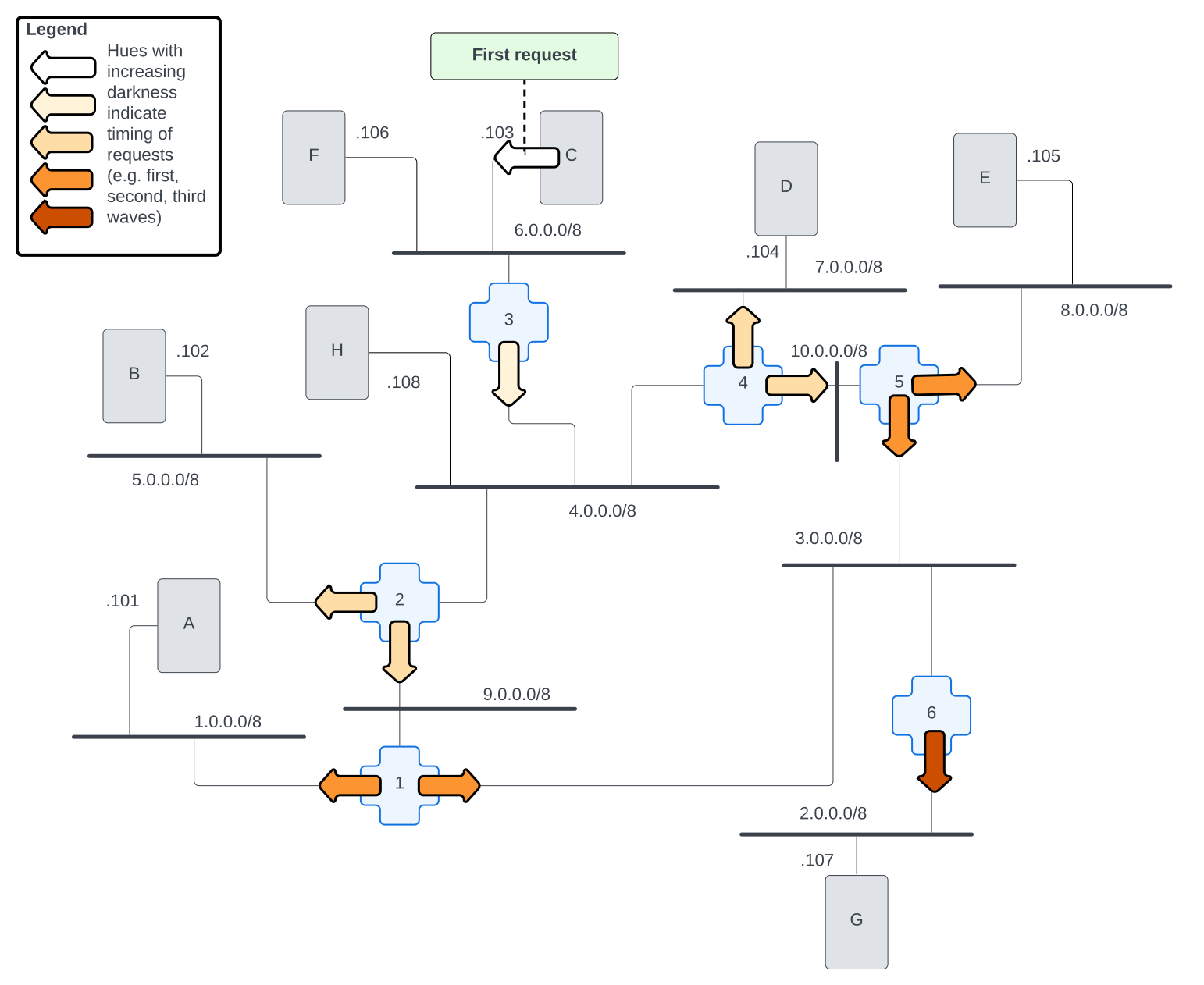
Each arrow in this diagram indicates a new proxied request for name resolution for host-h.local. The color of the arrows indicates how far down the proxy chain that request is.
Two important things to note about the request flow in this diagram:
First, when a router receives a request on one interface, it doesn't then send another proxied request out that interface, e.g.
router-5doesn't proxy a request back torouter-4.Second, when a router receives a duplicate request, e.g.
router-5receives a request from bothrouter-4ANDrouter-1, it doesn't start another round of proxying for that request.
The result of these behaviors is that messages don't go around the internet forever. Each message gets to every network once and only once. This is what we mean by "flooding" the network.
Next, let's look at how the response makes its way to every machine as well.
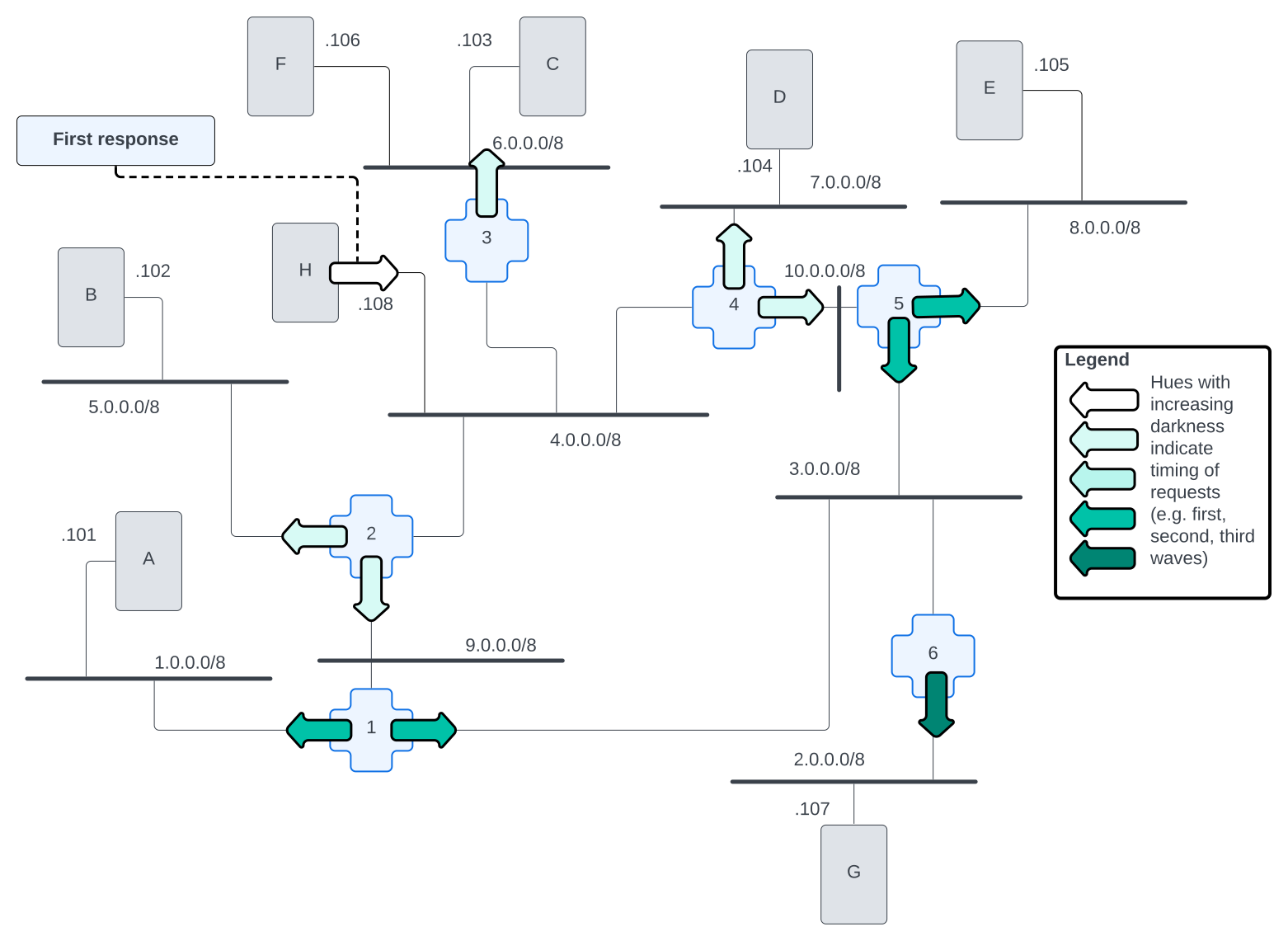
Here, we see that host-h generates the response message that gets broadcast to every router on the 4.0.0.0/8 network. Each router then proxies that message to each machine on each other network it has an interface on. As each router, in turn, does the same thing, this allows the response to flood back to every machine on the internet.
What this means is that every machine on our internet will already have an answer for where to find host-h.local. So, after the name resolution has been performed and during the cache window, you won't see any name resolution traffic. If you run a tcpdump on a different host while you run ping host-h.local on that host, you will not see another name resolution traffic for that name!
Exercises
Using links to browse our internet
Once you have avahi-daemon running on all the routers on our little internet, we should be able to use links to browse our images again! We'll need to be sure to use the *.local name:
root@host-c:/# links http://host-f.localLet's break it all
As we went over previously, Avahi name resolution works by editing the hosts entry in /etc/nsswitch.conf. Even if we have the avahi-daemon running on a machine, if we remove the mdns4_minimal entry from the hosts in /etc/nsswitch.conf, we'll break the name resolution process. Try it for yourself.
Can you explain why? If you're not comfortable with your explanation yet, review how a computer knows how to resolve a name in chapter 1.
Appendix
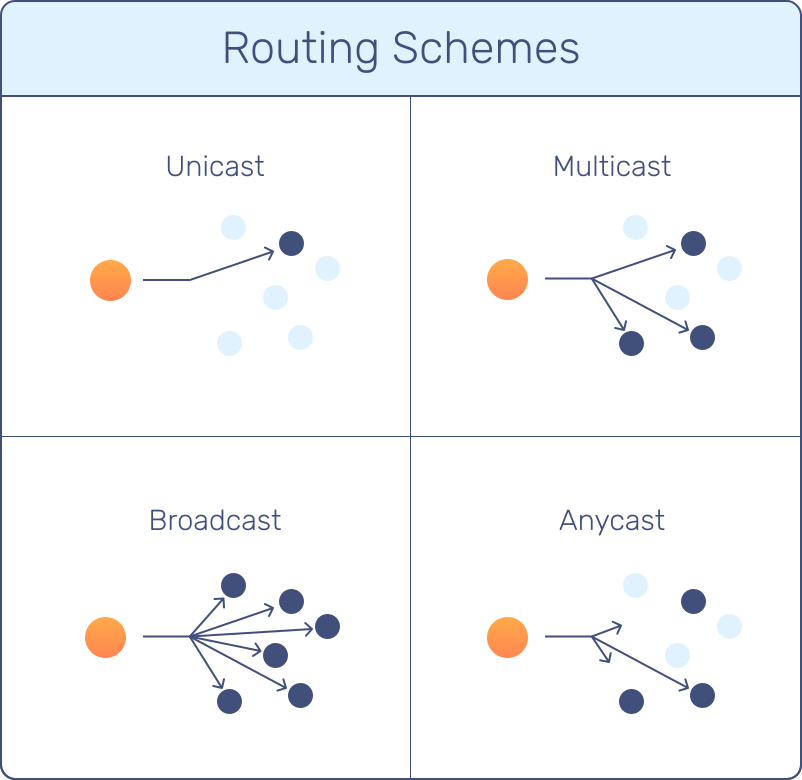
Unicast v. Anycast v. Broadcast v. Multicast
We've talked a lot in this chapter about multicast. But what makes multicast different from broadcast? Or hey, anycast and unicast for that matter? What do each of these routing schemes mean? Why would you use each one?
Unicast is what we think of when we think of most internet addressing. Unicast means that there is a single machine out there on the internet that responds to the destination IP address on a packet. One and only one machine is out there advertising that it is responsible for that IP address. Think of a unicast address like an exact location that you can type into your GPS. You know exactly where you're going and exactly what address you're going to end up at.
Anycast is an addressing scheme where more than one machine can answer queries for a single IP address. Each machine will advertise the same IP address into the internet. So, when client sends packets to an IP address that is anycasted to multiple machines, routers will make decisions on where to send the packets. Usually, routers are going to choose the shortest path to the destination, which will very likely be the closest machine. Importantly, the packets still end up on a single machine; they aren't sent to every machine that advertises the IP address. Think of anycast like doing a search for a business. You want to go to a Target. You don't care which location, you just need to get to any Target. You can type 'Target' into your favorite maps app, pick the location that's closest to you, and follow instructions on how to get there.
Broadcast is exactly what it sounds like; a message is sent out broadly, so every machine on a network will receive the packets being sent. Broadcast exists only within a single network; its packets do not get routed across an internet. Think of broadcast like talking into a megaphone inside a building. Everyone in that building can hear you, but no one outside that building knows whats being said.
Multicast is another routing scheme which sends packets to many machines at once. Unlike "broadcast" packets, there are special registered multicast addresses that carry semantic meaning. We saw that the IP address 224.0.0.51, for example, is used for multicast name-resolution. Machines that care about multicast name-resolution will listen for broadcast messages to this IP address and will respond accordingly. Furthermore, multicast is just broadcast that could be routed across multiple networks, but, in practice, this is rarely ever done.